
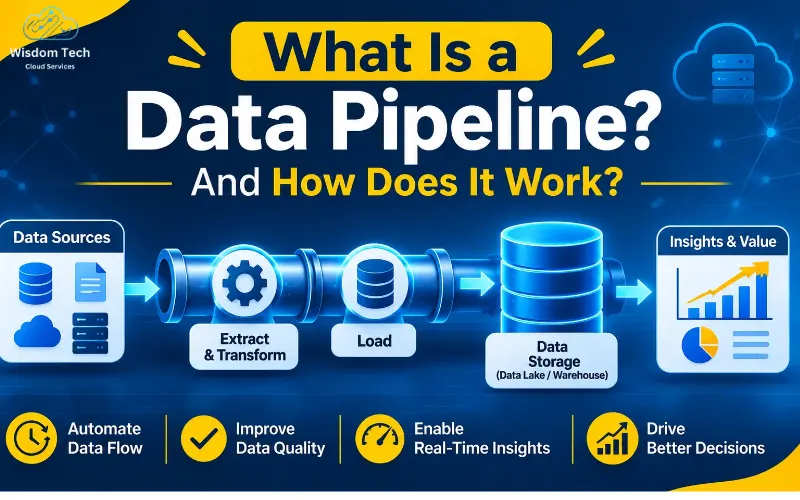
A data pipeline is a set of automated steps that moves data between systems. It pulls data from source systems, prepares it, and delivers it to storage. Teams then use that data for reports, apps, and machine learning.
Think of it as a water pipe for information. Data enters at one end. It flows through filters and checks. Clean, usable data comes out the other end.
Good pipelines save hours of manual work. They also keep numbers consistent across every team. AWS explains the basics of data pipelines well if you want another view.
Why Data Pipelines Matter
Most businesses collect data in many places. Sales tools, websites, apps, and sensors all create it. Without a pipeline, that data stays scattered and hard to trust.
A strong pipeline brings it together. Here is what you gain:
- One reliable view of your business data.
- Less manual copying and fewer human errors.
- Faster reports and fresher insights.
- Better inputs for AI and machine learning.
- Stronger data integration across teams and tools.
How Does a Data Pipeline Work?
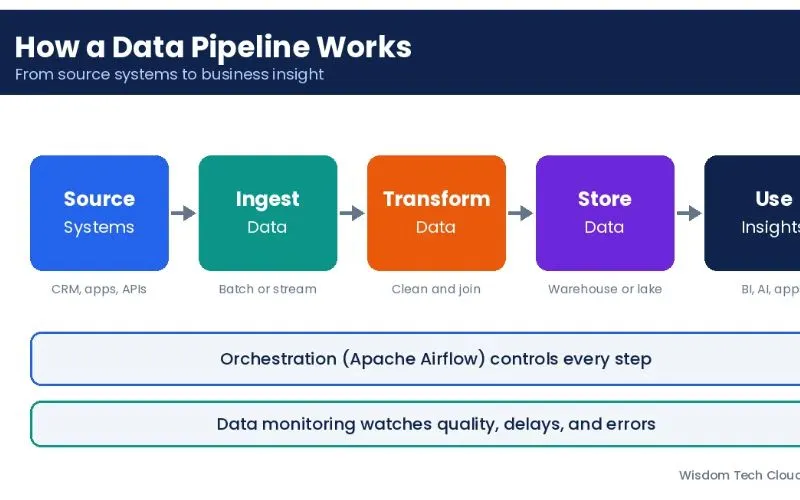
Every pipeline follows the same basic path. The tools change, but the stages stay familiar. Here is the flow from start to finish.
1. Source Systems
Source systems are where your data starts. They include databases, SaaS apps, APIs, files, and IoT devices. A pipeline can connect to one source or hundreds.
2. Data Ingestion and Extraction
Data ingestion is the step that brings data into the pipeline. Data extraction pulls records out of each source. This can happen in batches or as a constant stream.
Batch ingestion collects data on a schedule, like every hour. Streaming ingestion captures events the moment they occur.
3. Data Transformation
Raw data is often messy. Data transformation fixes that. It removes duplicates, corrects formats, and joins related records.
It may also calculate new fields. For example, it can turn order dates into monthly totals. This step makes data ready for use.
4. Data Loading and Data Storage
Data loading moves prepared data into its destination. Data storage then keeps it safe and easy to query. Most teams choose a data warehouse or a data lake.
A data warehouse stores structured data for reports and dashboards. A data lake holds raw data in any format. Many companies use both.
5. Data Orchestration and Workflow Automation
Data orchestration controls the order and timing of every task. It decides what runs first and what waits. It also retries tasks that fail.
Data workflow automation removes the need for manual triggers. Tools like Apache Airflow let engineers schedule and manage workflows as code.
6. Data Monitoring
Data monitoring watches your pipeline around the clock. It tracks delays, errors, and odd changes in volume. Alerts tell your team when something breaks.
Without monitoring, bad data can flow for days unnoticed. Good checks catch problems before users do.
7. Consumption
The last stage is where people use the data. Analysts build dashboards. Data scientists train models. Apps read fresh data to personalize results. You can see how this supports data analytics in daily business work.
Key Components of a Data Pipeline
This table shows how each part fits together.
Component | What It Does | Common Examples |
Source systems | Create the original data | CRM, ERP, APIs, sensors |
Ingestion layer | Collects data from sources | Apache Kafka, connectors |
Processing layer | Cleans and reshapes data | Spark, SQL, dbt |
Storage layer | Holds data for use | Data warehouse, data lake |
Orchestration layer | Schedules and runs tasks | Apache Airflow |
Monitoring layer | Tracks health and quality | Alerts, logs, dashboards |
ETL Process vs ELT Process
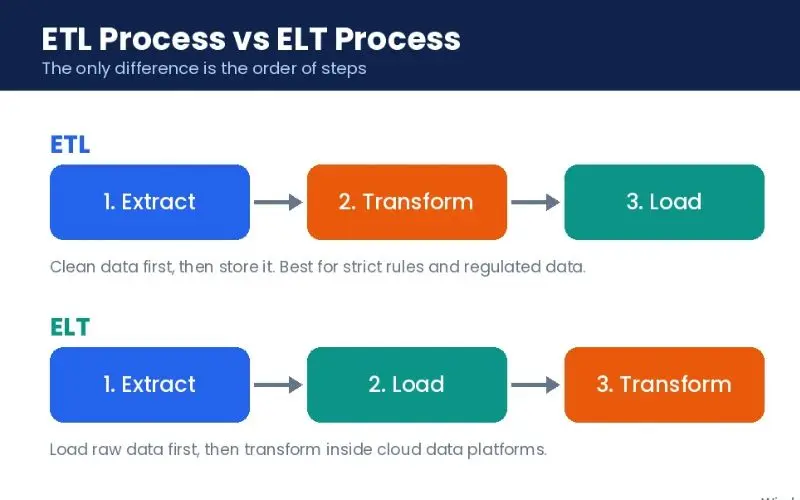
These two patterns shape how most pipelines move data. The difference is the order of steps.
The ETL process stands for extract, transform, load. Data is cleaned before it reaches storage. This works well when you need strict control over what gets stored.
The ELT process stands for extract, load, transform. Raw data lands in storage first. Transformation happens inside the warehouse or lake using its own power.
Feature | ETL Process | ELT Process |
Order of steps | Transform, then load | Load, then transform |
Best for | Structured data and strict rules | Large and varied data sets |
Speed to load | Slower | Faster |
Flexibility | Lower | Higher |
Typical setup | Traditional warehouses | Cloud data platforms |
Modern cloud data platforms make ELT popular. They offer cheap storage and strong computing power. Still, ETL remains useful for sensitive or regulated data.
Batch Processing vs Real-Time Data Processing
Data processing comes in two main styles. Your choice depends on how fast you need answers.
Batch Processing
Batch pipelines handle data in groups. They might run nightly or hourly. This suits payroll, monthly reports, and historical analysis. It is simple and cost-friendly.
Real-Time Data Processing
Real-time data processing handles events as they happen. It powers fraud alerts, live tracking, and instant recommendations. Apache Kafka is a popular platform for streaming events at scale.
Real-time pipelines cost more to build and run. Use them only when speed truly matters. If a daily update is enough, batch is the smarter choice.
Popular Data Pipeline Tools
The right tools depend on your data size, team skills, and budget. Here are the main categories.
- ETL tools: These move and transform data with little code. Examples include Talend, Informatica, and Fivetran.
- Streaming platforms: Apache Kafka handles high-volume event streams.
- Orchestration tools: Apache Airflow schedules and tracks complex workflows.
- Cloud data platforms: Snowflake, BigQuery, and Amazon Redshift store and process data at scale.
- Monitoring tools: These track pipeline health, freshness, and quality.
You do not need every tool. Start with what solves your biggest problem today.
Real World Examples of Data Pipelines
Pipelines appear in almost every industry. These examples show how they work in practice.
- Retail: A pipeline merges online and store sales into one warehouse. Teams then see true stock levels and demand.
- Finance: Transaction events stream through Kafka. A fraud model scores each one within seconds.
- Healthcare: Patient records from many systems flow into a secure store. Doctors get a complete view.
- Marketing: Ad data from many platforms lands in one dashboard. Teams compare campaign results quickly.
Best Practices for Building a Reliable Data Pipeline
Good design saves you from costly fixes later. Follow these habits from day one.
- Define clear goals. Know what questions the data must answer.
- Start small. Build one pipeline for one use case, then grow.
- Check data quality early. Add tests at each stage. Our guide on data quality management shows how.
- Automate everything you can. Manual steps cause delays and mistakes.
- Plan for failure. Add retries, alerts, and clear logs.
- Secure your data. Use encryption and role-based access.
- Document your work. Future teammates will thank you.
- Watch costs. Cloud bills grow fast when pipelines run unchecked.
Common Data Pipeline Challenges
Even strong teams face roadblocks. Here are the usual ones and how to handle them.
- Poor data quality: Add validation rules at ingestion and after transformation.
- Pipeline failures: Use data monitoring and automatic retries.
- Growing data volume: Pick storage and tools that scale.
- Schema changes: Source systems change often. Build pipelines that adapt or alert you.
- Tool sprawl: Too many tools create confusion. Keep your stack simple.
How Wisdom Tech Cloud Services Can Help
Building a pipeline takes planning, skill, and the right cloud setup. Wisdom Tech Cloud Services helps businesses design, build, and manage data systems they can trust. Explore our data and cloud services to see how we can support your pipeline goals.
You can also find more practical guides on our data and cloud blog.
Frequently Asked Questions
What is a data pipeline in simple terms?
A data pipeline is an automated path that moves data from one place to another. It collects, cleans, and delivers data so people and apps can use it.
What are the main stages of a data pipeline?
The main stages are source systems, ingestion, transformation, storage, orchestration, monitoring, and consumption. Each stage prepares data for the next one.
What is the difference between ETL and a data pipeline?
ETL is one type of data pipeline. A data pipeline is the broader concept of moving data. It can use ETL, ELT, or streaming methods.
What is the difference between a data warehouse and a data lake?
A data warehouse stores clean, structured data for reports. A data lake stores raw data in many formats. Many teams use both together.
What tools are used to build data pipelines?
Common tools include Apache Kafka for streaming and Apache Airflow for orchestration. Teams also use ETL tools and cloud data platforms like Snowflake and BigQuery.
When should I use real-time data processing?
Use it when delays cost you money or trust. Fraud detection, live tracking, and instant alerts are good examples. Otherwise, batch processing is usually enough.